Why Your Link-in-Bio Is Your Best Course Sales Channel
Email converts better per contact. Ads scale faster. But your Instagram link-in-bio is the one place where warm followers — people who already watch your content and trust your expertise — self-select to see what you're selling. That intent signal is enormously valuable. The problem is most course creators treat their bio page as an afterthought and leave significant revenue on the table.
This guide walks through the exact setup for a course creator's link-in-bio page using Flonix — the tool with Smart Link Optimization, compare-at pricing, and templates specifically designed for creators who sell with their face and content.
Step 1: Choose the Right Template
For course creators, two Flonix templates convert especially well:
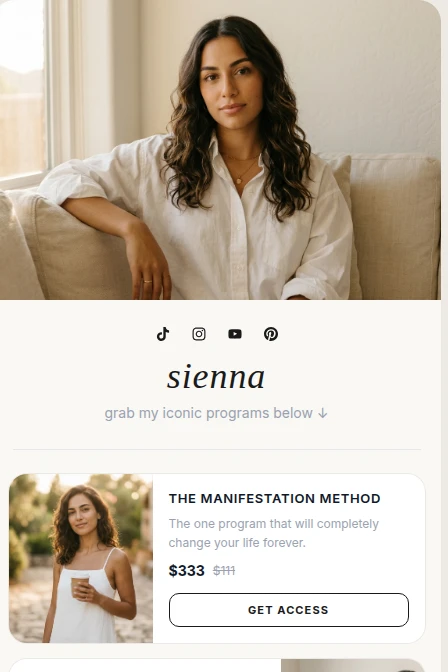
- Luminary (Alternating Cards): Full-bleed cover photo at the top with image cards alternating left-right below. Each course gets its own visual moment. Best for creators with 2–4 distinct programmes at different price points.
- Bold Offers: Clean white background, big rounded product cards, bold accent CTA buttons. Best for creators with a clear flagship programme they want to promote above everything else.
Step 2: Structure Your Link Page for Maximum Conversion
Course creators should follow this link hierarchy:
- Free lead magnet — a free workshop, PDF checklist, or mini-course that captures emails and warms up cold followers
- Flagship course — your best-selling or highest-margin programme with full product block (image + price + compare-at)
- Discovery/strategy call booking — for creators who also do 1:1 coaching
- 1–2 additional courses — lower-ticket entry offers or advanced programmes
- Social links — YouTube, TikTok, Instagram, Spotify if relevant
Enable Smart Link Optimization after publishing. Let Flonix's engine track click data for 7 days and automatically re-rank your links based on what your audience actually engages with. Counter-intuitively, many course creators find their free lead magnet drives 3× more clicks than their paid course — which means it should be first, even if that feels wrong. The lead magnet warms up the lead, making the paid course sale more likely later.
Step 3: Set Up Product Blocks with Compare-At Pricing
A product block in Flonix supports:
- Title: "12-Week Business Accelerator" (specific beats generic)
- Description: One sentence on the transformation — "Go from 0 to $10k/month with our proven system"
- Thumbnail: Course mockup image or a photo of you teaching (vertical crop recommended)
- Sale price: Your current price, e.g. $497
- Compare-at price: Previous price or full retail, e.g. $997 — displays as strikethrough creating urgency
- Currency: USD (global default) or your local currency
- URL: Your Gumroad, Lemon Squeezy, Teachable, Thinkific, or Kajabi checkout link
The compare-at price is critical. Anchoring to a higher original price — even if you've always sold at $497 — creates the perception of a deal. This is standard practice in digital product marketing and is built into Flonix's product block at no extra cost.
Step 4: Write a Bio That Pre-Sells Your Course
Your bio description (under your avatar on the link-in-bio page) should establish your credibility before a visitor reads a single link. Follow this format:
"[What you teach] · [Who you've helped] · [Your result or credential]"
Examples:
- "Digital marketing educator · 3,000+ students across 50 countries · Former Google Ads Manager"
- "Fitness coach · 12-week transformations · NASM + PN1 certified · 500+ clients"
- "Real estate investing educator · $2M in student-acquired properties · Ex-Goldman analyst"
Step 5: Drive Traffic from Instagram Content
Your link-in-bio page only works if people visit it. Three Instagram content strategies that reliably drive bio clicks for course creators:
- Free value carousels: A 7–10 slide carousel delivering a mini lesson from inside your course. Last slide: "Get the full system — link in bio."
- Testimonial posts: Before/after or results screenshots from current students. Caption: "How [Name] went from [X] to [Y] in [time]. My course is how — link in bio."
- Behind-the-scenes content: Show yourself creating course content, teaching live, or reviewing student work. Creates FOMO and drives curiosity about the full course.
Frequently Asked Questions
Which link-in-bio tool is best for course creators in 2026?
Flonix is the best free option for course creators — Smart Link Optimization auto-ranks your course links by click data, compare-at pricing creates conversion urgency, and the Luminary and Bold Offers templates are purpose-built for creators selling high-ticket programmes. Stan.store ($29–99/month) is better if you want a native checkout without Gumroad or Lemon Squeezy.
Should I show my course price on my link-in-bio?
Yes — for fixed-price courses. Showing the price (especially with a compare-at/original price) pre-qualifies visitors and reduces time wasted on clicks from people who can't afford the course. For high-ticket courses ($2,000+), link to an application or discovery call page instead of a direct checkout.
How many courses should I list on my link-in-bio?
2–3 maximum. More than 3 course options creates choice paralysis and reduces total purchases. Use a free lead magnet as the top block and have your flagship course as the second block, with one additional course as a third option.
Can I use Flonix with Teachable or Kajabi?
Yes. Flonix product blocks accept any checkout URL. Paste your Teachable, Kajabi, Thinkific, Podia, or any other course platform checkout link into the URL field. Flonix displays the product card with pricing — clicking sends the visitor to your course platform's checkout page.